English
Request a call Open the demo
Internal system for SMEs

Features

What IntrApp covers

IntrApp is not a collection of separate programs that you have to connect, but one system in which the customer, the work and the invoice are linked. Here you will find a short description of each area, with the full list on the area’s own page.

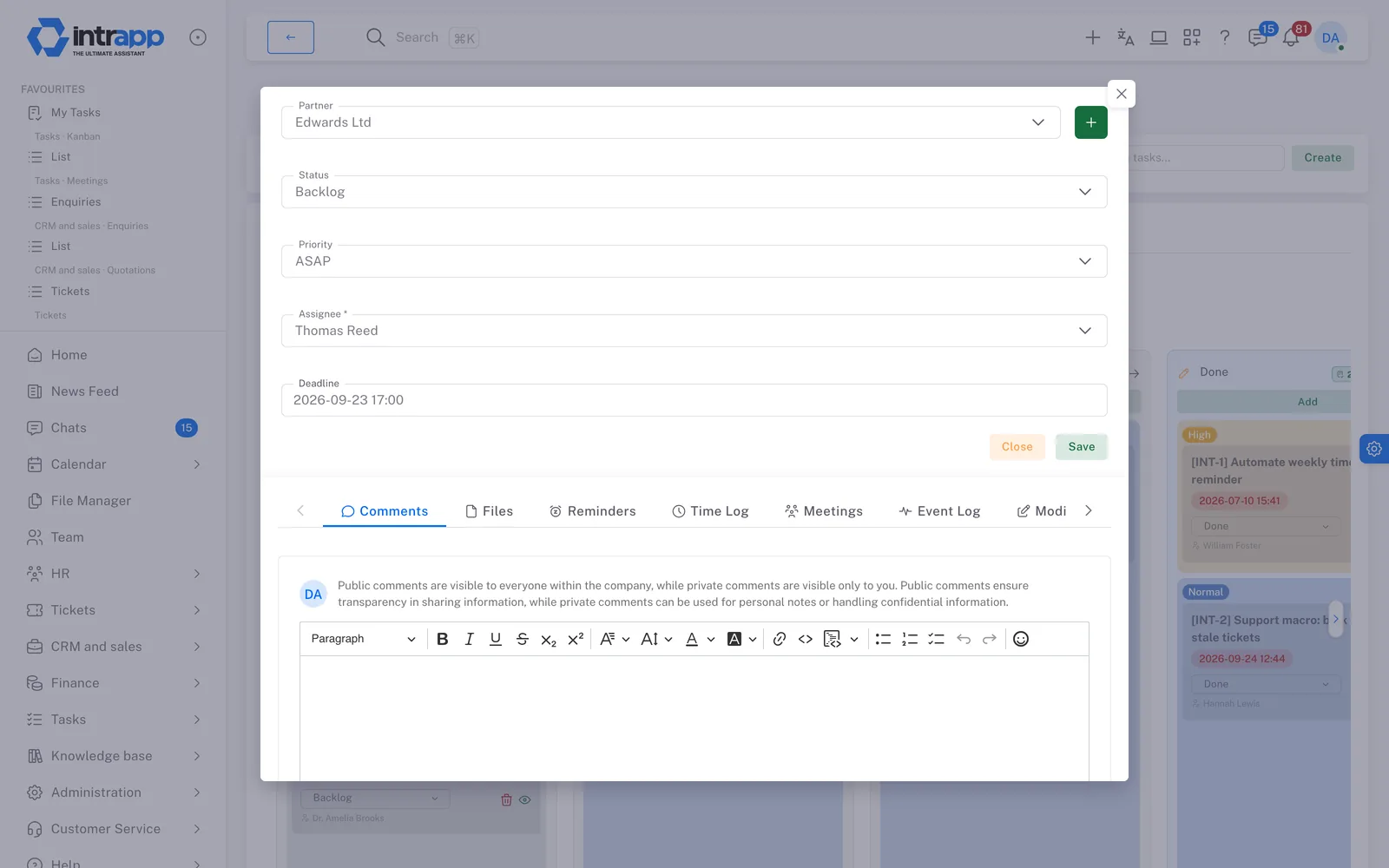
A task in IntrApp, showing the customer it belongs to, the owner and the deadline, with comments, files and logged time below.
What makes it different

Several areas, but one system

You can work in IntrApp from day one, and it gives your company a complete foundation without any add-ons.

If you have a specific requirement, we do not start from nothing. We build on this foundation.

The whole journey

From an enquiry to a paid invoice

When someone fills in your website form, the submission becomes a lead straight away. A requirement survey can follow, then the quotation, which becomes a project once approved and finally an invoice. Each step builds closely on the one before, so you never have to enter anything twice. At the end, the customer’s record holds the whole story, showing the original need, what you offered and the work that was done. No step is compulsory. The system only suggests the logical next step and never forces you into a rigid structure.

Someone fills in your website form

The contact form embedded in your website creates a lead automatically. If a new message arrives from the same email address within thirty days, the system adds it to the existing thread by itself.
Details

A lead with its exact source

The record shows the incoming message, its exact source and the colleague responsible straight away. You can name the sales statuses freely to match your own process.
Details

A requirement survey in their language

You can send a targeted questionnaire from the system, which the enquirer fills in without signing up. Their answers go straight into the lead’s history.
Details

A quotation from the survey

The quotation is built directly from the completed survey. You bring in the items from the central catalogue at the price you agreed with the customer.
Details

The customer decides, no login

The customer can easily accept or decline the quotation, or ask for changes. The decision appears at once on their record, on the lead and on the quotation itself.
Details

From accepted quotation to project

One click starts a new project board from your own templates, and the header takes you back to the original quotation at any time. Time spent is logged directly on the tasks.
Details

An invoice to the customer

The enquirer officially becomes a customer, and you issue the invoice through your existing invoicing provider. For now the quotation items still have to be carried over separately, but the documents stay closely linked in the background.
Details

The money comes in

The system suggests a matching invoice for each bank statement line, and the decision is yours. The project can be closed, and every step stays traceable in the customer’s event log.
Details
Customers and sales

From the first contact to the signed contract

Customer and partner management

Partner records, active leads, follow-up tasks and customer reports are handled in one place, without keeping separate spreadsheets.
Details

Forms & surveys

Forms submitted on your website become organised leads straight away. The customer fills in the requirement survey in their own language, without creating an account.
Details

Quotations

You can prepare professional, itemised quotations in the customer’s language. The customer approves them on a separate page, and one click turns them into a live project.
Details

Catalogue & pricing

You maintain prices in one central place. When documents are issued, the system automatically applies the custom price you set for that customer.
Details

Contracts

Formal documents are created from ready-made templates, filled in with real customer data. The final version becomes a locked PDF, and the system sends an automatic alert as the expiry date approaches.
Details
Work

From the assigned task to the closed meeting

Projects & tasks

Tasks and complex projects sit on one clear board. Everyone involved can see exactly where things stand and what the next steps are.
Details

Meetings

Meetings come with an agenda set in advance and formal minutes. One click turns the commitments made in a meeting into assigned project tasks.
Details

Calendar

You can connect your own schedule and deadlines to your Google, Apple or Outlook calendar, so everything shows up where you do your daily work.
Details

Tasks, reminders and notes

Build your own private to-do list and set timed reminders for every important task, so no commitment is forgotten.
Details

Dashboard

You build the home screen from blocks you can move freely. It always shows the latest data and the reports that matter to you.
Details
Finance

From the issued invoice to the money received

Invoicing

You can handle standard and recurring invoices, as well as cancellations and corrections. Certified invoices are issued through your invoicing provider, and you can export the finished data straight into your accountant’s software.
Details

Cash flow

One view shows your receivables and your own payables. The system suggests matches between bank statement transactions and documents, and final approval always stays with you.
Details
Knowledge and communication

What stays with the company, not in people’s heads

Internal communication

Built-in chat, a shared message board, notifications and comments on tasks speed up coordination. You need fewer internal emails, and answers arrive much sooner.
Details

Knowledge base

Your company’s working experience builds up in one central place, in order, so important information is not lost in conversations or in colleagues’ memories.
Details

File management and data

Uploaded files are linked directly to the projects, tasks and partners they belong to, so you find them exactly where you are working with them.
Details
HR

From employee records to the monthly close

HR

This is where you manage the central employee register, employee documents and the company organisation chart. Salary data is protected by a strict permission system, and every view goes into a security log.
Details

Leave & payroll close

The system prevents conflicting or duplicate leave requests. Once the monthly close is finalised the data is locked, so payroll always knows which version it is working from.
Details
Custom requirements

Still need something more?

Even for a custom requirement, we do not replace what you already use; we build on the foundation. If you need a feature that is not there, write to us. If roughly three quarters of our customers would also use it, we build it for free and every customer gets it. We decide whether a request falls into this group, because we are the ones who see the whole customer base. We do not promise a delivery date, but we do promise that the request enters development. What is specific to you is built as custom development, just for you.

Honestly

This is not a specialist tool

IntrApp is not a tool built for one area. It is the Business Operating System the company runs on.

What is not in it

IntrApp exists for the case where specialist tools do not hold the whole workflow together, which is exactly what scatters the work. IntrApp keeps the work in one piece from beginning to end, not just one part of it.

If what you want is a specialist tool for a single job, you will find something deeper than us, and that is as it should be. It is not a shortcoming, it is a decision. The industry-specific part is a different question. It does not come ready-made, but we can build it, because the domain knowledge is yours and the engineering is ours. Whether we are the right choice is better known at the start, which is what the trial is for.

Take a look inside

In the demo you can click through every area listed here with sample customers, projects and documents, with no sign-up and no card, and because it resets every night, you cannot break anything. To try IntrApp with your own data, use the free trial.

  • No sign-up
  • No bank card
  • Full functionality

Want to see how this would work for you? We will call you back.

Got a question? Rather talk to someone?

One of our team will get in touch within one working day.

When can we call?

If you add it, we send you a summary of our call.