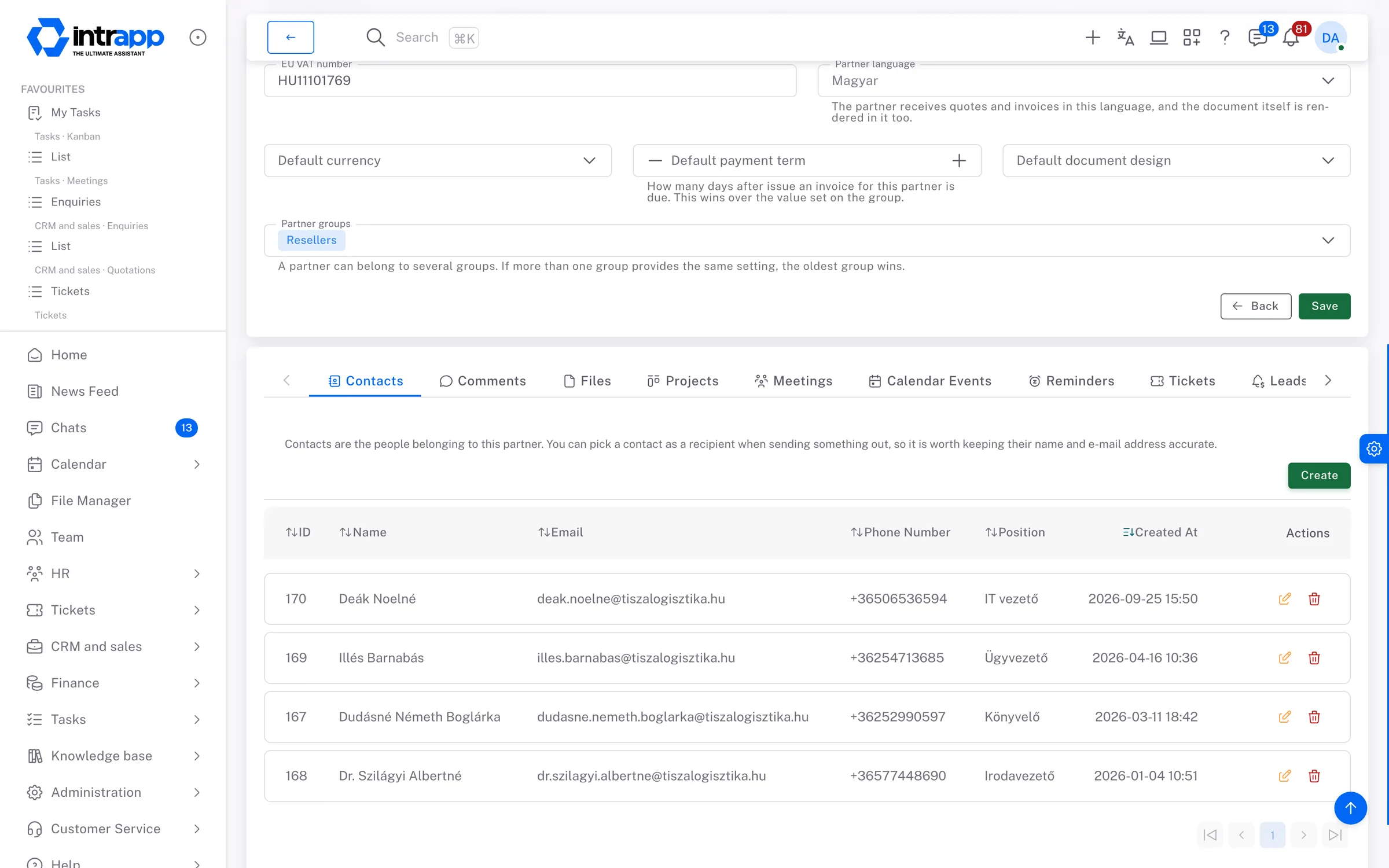
Most leads are not lost because nobody cared. They are lost because they arrived in one person's inbox on a day that person was busy with something else. This page shows how an incoming lead becomes an item with a date and an owner.
Only one person knows the contact at that customer. When they are away, everybody else
digs through old emails looking for a phone number while the customer waits.
The callback with no date on it
You tell the customer you will get back to them in a couple of weeks. When the time
comes, nothing reminds anyone, because it all depended on someone remembering. The
customer, however, does remember.
The history that sits in three places
The customer's history is split between an email thread, a group chat and a shared
folder. When the customer asks where things stand, somebody has to read all three
before they can answer.
Customer management
Every customer has one central record
A customer record is more than an address list. It holds the contacts, the notes, the attached files, the calendar events, the tickets and the projects that belong to that customer. Nobody has to collect them, because that is where they were created.
You do not have to say goodbye to the spreadsheet
You can import your existing customer list using a sample spreadsheet and a preview,
and export it just as easily. Day one does not start with an empty system, and if you
ever leave, your data leaves with you.
No typing in company details
Enter a company's tax number and IntrApp fills in the name and registered address from
the official register. For an EU VAT number it asks the EU validation service, and for
a Hungarian tax number the Hungarian tax authority's register. You can also search
public company registers by name. It never overwrites a
filled-in field without your approval, and shows you what would change first.
Public and private notes
Notes you write for the team are visible to the team, and notes you write for yourself
are visible only to you. You do not need a private notebook alongside the company's
records.
Entered once, not again
Customer details go in once, and from then on tasks, events and tickets all attach to
that one record. That saves the hours usually lost to searching for information and
typing the same details twice.
Leads
An incoming lead is a job of its own, not a forwarded email
Every lead is an item in its own right, with a name, a value, a deadline, an owner, a status and a source, linked to the partner it came from. From then on you can ask where it stands, instead of asking who opened it first. If it comes from the form on your website, the lead is created automatically.
Sources you named yourself
You are not picking from preset categories. If referral, trade show and returning
customer are your three real sources, then those are the three you record. Six months
later they tell you which one brought in actual work, and which one you overspent on.
Statuses that match your process
You create the statuses, with names and colours of your own. One look at the list
then shows which leads are waiting on you and which are waiting on the customer.
Every contact is written down
For every email, call or meeting, you record what happened, what the next step is and
when it is due. You can log the time spent here too, because selling is work, even
though it rarely gets counted as work.
Files stay attached to the lead
Documents you receive sit next to the lead, not in somebody's inbox. When the
lead comes up again months later, nobody has to be asked to dig them out.
demo.intrapp.io
Follow-ups
“We will be in touch” is a date, not just a promise
A follow-up is a separate item that carries the date, the person, the subject and the owner. It is not an entry in one person's private calendar. It sits on the customer record, where your colleagues can see it.
The next step has an owner
Nothing depends on somebody remembering. Every follow-up carries a date and a name, so
if that person is off sick, a colleague can see straight away what the plan was.
Time spent on a customer is measured, not guessed
You can log callbacks, meetings and site visits here. At the end of the month you will
not just feel that one customer took a lot of time, you will know how much.
The history stays put
Six months later you can still read back how many times you spoke and what was said
last time. That is what makes the fourth call different from the first three, because
you do not have to start by introducing yourself again.
Phone book
Contact details should not live in one person's phone
Every contact at every customer sits on that customer's record, along with what each of them is responsible for. The person who decides the technical question and the person who signs the order are usually not the same person.
A fragment is enough to find them
You do not have to remember which company they work at, or exactly how their name is
spelled. Part of the name or part of the email address will do.
You decide who sees what
Permissions control which colleagues and subcontractors can see contact details.
Someone who works with you on a single project does not get to see your entire
customer base.
The role sits next to the name
Next to the phone number you can see who decides what. For a new colleague, that is
the difference between getting on with the job and interrupting someone to ask who to
call.
Tickets
Every report has a route to a resolution
A ticket is the record of something a customer reports, such as a fault or a question. It has a status, a type, a priority, an owner and a department, so it can be followed from the first report to the close. It is linked to the customer, so their record shows that they have something open.
Tickets from email, automatically
Once a ticket inbox is set up, every new email becomes a ticket with its attachments,
and a reply lands on the ticket it belongs to. Nothing depends on somebody forwarding
it to the right person.
Internal notes that stay internal
A note on a ticket can be yours alone or visible company-wide. It is kept separate
from the correspondence with the customer, so an internal remark does not reach the
customer by accident.
If it becomes work, it becomes a task
A ticket turns into a task on the kanban board, the column-based task board, with one
click, and the link between the two stays. Whoever works on it sees the original
report, not a summary of it.
Departments and types you define
A ticket from email gets the default department, type, priority and owner at once,
and the sender is linked to the customer by email address. If it belongs elsewhere,
you move it, instead of sorting through a shared inbox every morning.
How it fits together
Not five separate lists, but one working system
If you run five to ten separate subscriptions today, that is not a system, because none of them knows about the others. The three connections below work because every part of IntrApp links to the same customer.
A lead becomes a customer, the history stays
When a lead turns into an order, you do not open a new record. The record and its
full history stay, and the related projects appear next to them.
Open issues show up on the customer
You do not have to ask a colleague whether anything is outstanding. The customer
record shows the open ticket, the last call and the next appointment before you pick
up the phone.
Time lands where the work happened
Hours logged on follow-ups and tickets appear in the same report as project hours.
That shows, while the year is still running, which customer takes more work than they
bring in.
Who sees what
Being the owner is not a visibility limit
Access in IntrApp is decided by the role, and it is better to be clear about that from the start:
Three roles come built in, you can create your own, and the rights are set per area. Anyone given access to customers sees the whole customer base, not only their own customers.
A lead and a customer both have an owner, but that means responsibility, not a visibility boundary. You can filter by it yourself, but the system does not hide the rest from your colleagues.
In a company of three to fifty people this is usually the right way round. The more common problem is not that somebody sees too much, but that nobody can get at what one person was handling while they are on holiday.
If you need a salesperson to see only their own customers, IntrApp cannot do that today. We would rather tell you now than three months in.
One call
What is on the screen before you dial
Most uncomfortable customer conversations start because one side remembers something and the other does not. These three things are on the customer record before you dial.
When you last spoke, and about what
You see the date of the last call, meeting or email, together with what was agreed.
You do not have to open by asking the customer where you left off.
Whether they have something open
If the customer reported something and it is still open, it is better to know before
you say a word. An open ticket shows on the customer record, not only with the person
handling it.
How much work they have taken
The hours logged against the customer are totalled on the record. A conversation about
price goes differently when you have a figure in front of you rather than a vague
memory that they took a lot of work.
Frequently asked
What most people ask at this point
These are not questions we made up; they are the ones we hear most often. None of the answers is that you will get used to it.
We keep our customers in our heads
Up to a few dozen customers that works, and that is exactly the danger. The customer
who slips out of view is the one you have not been in touch with for six months.
That is usually where the least effort would bring in new work.
The team will not use it anyway
This is a common question, and a fair one. That is why there is a manual and
a built-in walkthrough inside the app, so that when someone does not understand
something, they do not have to ask you. There is no training day, because there is
nothing to train.
What happens to the data we already have
You can import your customer list at the start, so day one does not begin with an
empty system. Data can be exported too, so starting does not lock you in.
How long before it works
Automated setup takes about half an hour, and then you are live. There is no
implementation project and no consultancy day rate. If you want help, our specialists
are glad to give it.
Where we stop
Specialist tools are deep, and most of that depth sits unused
A dedicated sales system does a great many things, but most of that depth is neither understood nor used by most people. So the value is not depth, it is breadth and clarity. IntrApp is not a CRM and not an ERP. It is the Business Operating System your company runs on. If you are looking for a CRM, you will find a better one, and that is as it should be.
What you will not find here
There is no campaign management, no lead scoring and no sales forecasting. If your
work is built on those, you are better off with a specialist tool, and it is better
to know that now than three months in.
Ask, and you may not have to pay for it
If a feature is missing, tell us. If roughly three quarters of our customers would
use it too, we build it for free and every customer gets it. We decide whether a
request falls into that group, because we see the whole customer base. We do not
promise a delivery date, but we do promise that the request goes into development.
What is specific to you gets built as paid custom development, and it keeps
receiving the shared updates. Exactly where the line runs is set out on the
custom development page.
No training required
There is a manual and a built-in walkthrough inside the app, so when you do not
understand something, the app explains it. Automated setup takes about half an hour,
and there is no implementation fee. If you want help, our specialists are glad to give
it.
Take a look inside
The demo shows the whole system with sample customers, projects and documents, with no sign-up and no credit card, and it resets every night, so you cannot break anything. You can try it with your own customers and projects during the free trial.
The cookies needed to run the site are always on. We use statistics and marketing cookies only with your consent, and you can change your decision at any time under Cookie settings in the footer.
Privacy policy