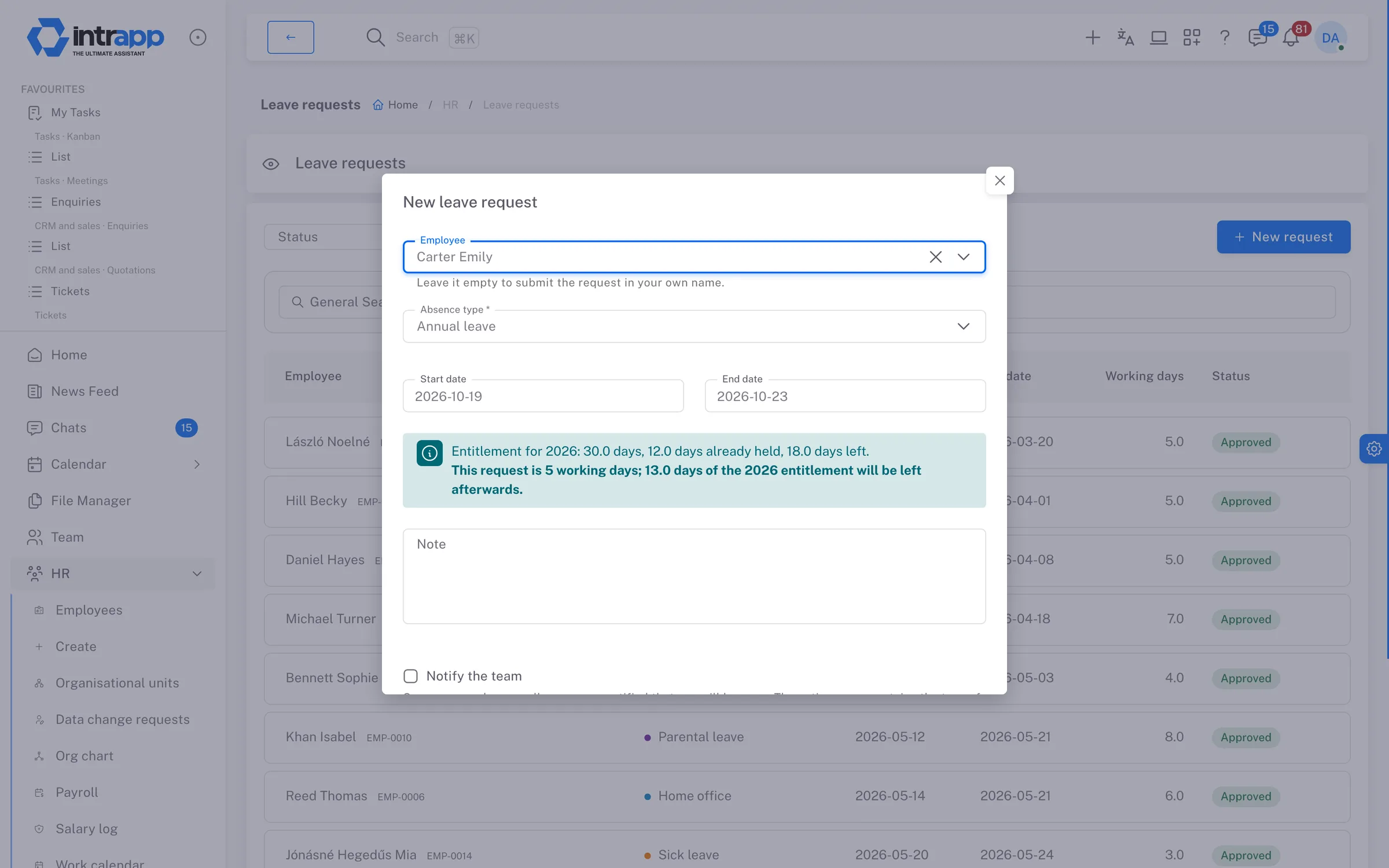
Employees request leave in the system, and their manager approves it. The request reserves the days the moment it is submitted, so the same period cannot be booked twice and the entitlement cannot be overdrawn. At the end of the month you close the approved absences, and payroll receives a report that cannot later change without their knowledge.
One person keeps track in a spreadsheet of how much leave everyone has taken and how
much is left, and every question means they have to look it up.
Two yeses for the same week
Two colleagues ask for the same week off, both are told yes verbally, and only a week
later does it turn out that nobody will be in.
The list that changes after payroll
Payroll has already received the month's absences, then someone changes a day
afterwards, and nobody knows which version the salaries were calculated from.
Leave requests
A request that reserves the days when it is submitted
The employee picks the type of absence and the days, and sees as they go how much leave they are entitled to, how much is already reserved and how much will be left. Weekends and public holidays are not deducted, but a moved working day is. A request reserves the days before anyone decides on it, so two requests cannot cover the same period and the entitlement cannot be used up twice.
The manager decides, no extra permission
A direct manager can decide on their reports' requests without any special
permission, because the right follows from the reporting line and ends by itself when
that line changes. Nobody can approve their own request, without exception.
The type is nobody else's business
When the team is notified of an approved absence, the type of absence is never
included, because whether someone is on sick leave or on holiday is not their
colleagues' business.
Their own balance, even without an account
Employees who never log in receive the decision by email, with a personal link. The
link lets them view their own entitlement and requests without signing in, but not
change anything. Salary, home address and other colleagues' data never appear there.
Entitlements and work calendar
Every number comes from your settings, not from the software
You set up the absence types, the entitlements and the work calendar yourself. Base leave is set per country, and the extra leave granted for age and for children is set in bands. No country's rules are built into the system, so setting up any country only takes new rows, not development.
The new year starts by itself
You do not have to open the new year by hand. Every night the system creates the new
year's entitlements and the days carried over, pro-rates the entitlement for people
who join mid-year, and recalculates it when a date of birth or the number of children
changes.
Why is my entitlement this much?
The annual entitlement is itemised, with base leave, extra leave for age and for
children, days carried over from last year and manual corrections each on its own
line. That way the question is answered at once.
A work calendar per country
Each colleague counts by the calendar of the country they work in, so someone working
in Slovakia gets the Slovak calendar. You enter public holidays per country, and for
Hungary they are already entered for this year and the next two.
Payroll close
A closed month does not change behind payroll's back
At the end of the month you close the approved absences. The close takes a day-by-day snapshot with each employee's name and code, and the snapshot remains even if a request is deleted later. While any request for the month is still undecided, the close does not start, and the system lists the requests concerned.
Nothing taken away, additions allowed
A leave day in a closed month cannot be cancelled or rejected. You can still add an
absence afterwards, however, and it goes into the next report, marked with the month
it belongs to.
Reopening with a reason, as a new version
If a month has to be reopened, a reason is required, and the system logs it. Closing
it again creates a new version number, and the old version is kept with its own file,
so payroll always knows which version they received.
The report payroll asks for
The system produces and archives a spreadsheet with each close. The detailed report is
broken down by employee and day, and the summary by employee and absence type.
Salaries only appear for those allowed to see them, and every such download is
logged.
demo.intrapp.io
How far we go
Leave and payroll close, not payroll
IntrApp records, closes and hands over absences, but it does not run payroll. There is no gross-to-net calculation, no contributions, no payslips and no returns, because your payroll provider prepares those from what you send them.
6default absence types, renameable
4switches per type, from entitlement to paid
0built-in leave rules, every number comes from your settings
How it connects
Leave shows up where it matters
An approved absence becomes an all-day event in the employee's own calendar, and the “Away today” block on the home screen shows who is out, without the type of absence. Entitlements are calculated from the employee records, and the close file goes into the file manager, where only people with payroll permission can open it.
Employee records, documents and how salaries are protected are covered on the
HR page.
Who sees what
Everyone sees what concerns them
Employees see their own requests, managers see their own and their reports', and HR sees everyone's. Setting up entitlements and the work calendar requires a separate leave administrator permission, and the salary columns in the report require permission to view salaries.
What you will not find here
Accurate data for payroll, not payroll software
There is no shared company calendar showing everyone's absences together, and colleagues without an account get no calendar event. Moved working days cannot be calculated in advance, so you add them by hand, in the Hungarian calendar too.
If you are looking for payroll software, IntrApp is not it. What it does is make sure
your payroll provider receives accurate data that does not change afterwards.
Frequently asked
What most people ask at this point
We did not make these questions up; they are the ones prospective customers ask us most often. None of the answers is that you will get used to it.
Does it work for colleagues in another country?
Yes. The work calendar is kept per country, and each colleague counts by the calendar
of the country they work in. You set up a new country's entitlements by adding new
rows, without development.
What if someone forgot to request leave?
A leave administrator can record the request on the colleague's behalf afterwards,
even as already approved. Every check still runs, and the system records who entered
it.
What exactly does payroll receive?
Payroll receives a closed, versioned report of the month's approved absences and, on
request, a summary by employee and type. Most payroll providers ask for the summary and
only look at the detailed report when something does not add up.
Missing features
Ask, and you may not have to pay for it
If an absence type setting or a report is missing, tell us. If roughly three quarters of our customer base would use it, we build it for free, and every customer gets it. We decide whether a request falls into that group, because we can see the whole customer base. We do not promise a delivery date, but we do promise that the request goes into development.
The demo shows, with sample employees and sample requests and no sign-up, how a leave request moves from submission to the monthly close. To try it with your own team, that is what the trial is for.
The cookies needed to run the site are always on. We use statistics and marketing cookies only with your consent, and you can change your decision at any time under Cookie settings in the footer.
Privacy policy