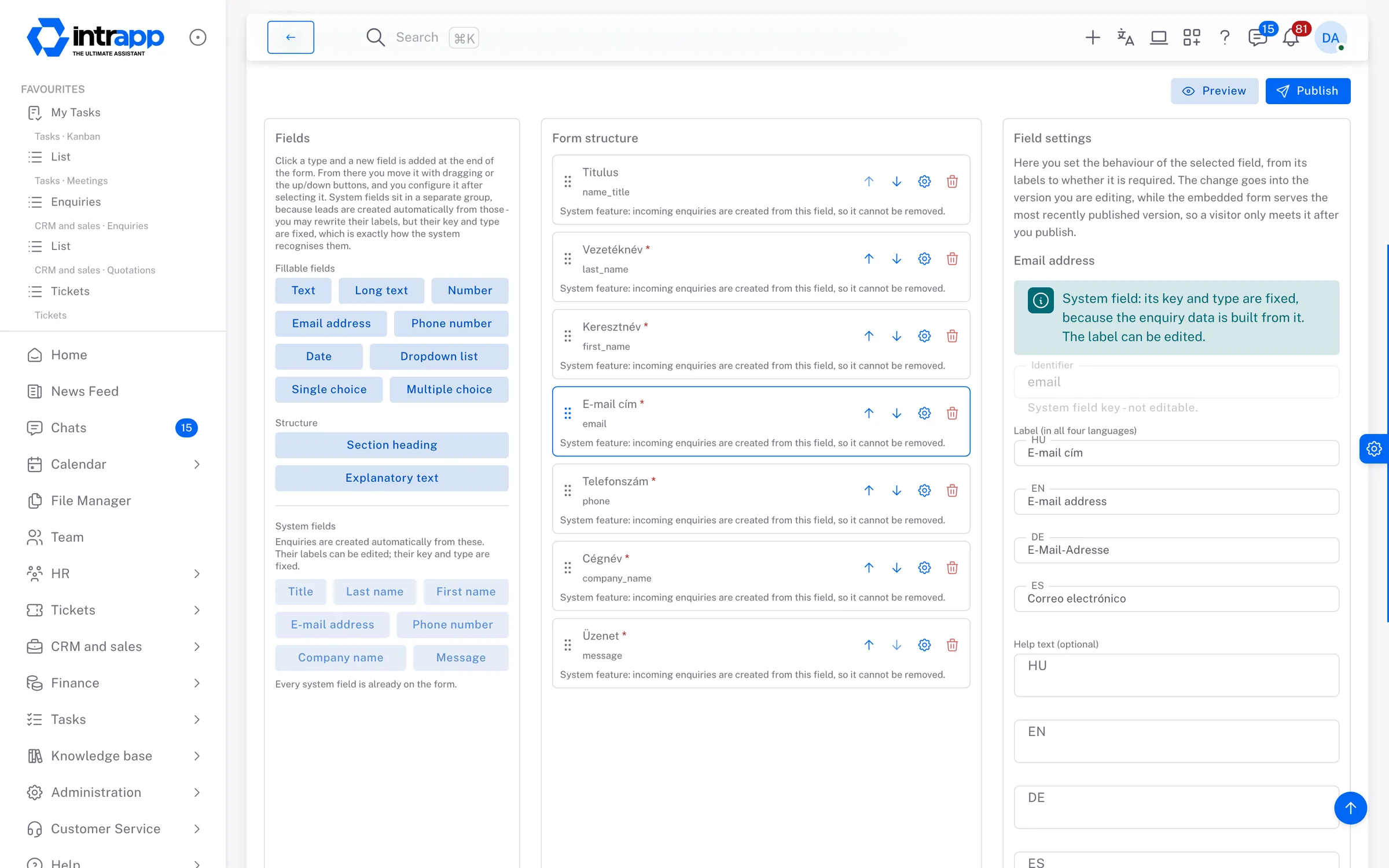
Every submission from the contact form on your website becomes a lead in IntrApp automatically, instead of waiting in an inbox for someone to copy it across. When you need to know more, you send a requirement survey. The recipient fills it in without logging in, in their own language, and the answers are added to that lead's history.
The website form sends an email, and somebody either copies it into wherever the
work is tracked, or does not. Nobody ever finds out what got lost that way, because
nothing shows that it is missing.
The second email that looks like a new case
The same person writes again a week later, and two colleagues start on it as two
separate cases, with two different answers.
The requirements that stay on the phone
How many users, which areas and by when are all discussed on a phone call. By the
time you write the quotation, nobody remembers exactly what the customer asked for.
Form builder
A form built with clicks, living on your website
You build the form without writing any code, by dragging the fields into place and setting the labels. Two lines of code put it on your website, in a WordPress Custom HTML block, with no plugin. Visitors see the form in their own language, and the answers arrive in IntrApp, not in an inbox.
Nine field types, four languages
A field can be short or long text, a number, a date, an email address, a phone
number, a drop-down list, or a single or multiple choice question. Every label is
entered in Hungarian, English, German and Spanish, and visitors get the form in
their browser's language. A visitor who does not read the form's language would most
likely be unable to fill it in.
A published version never changes afterwards
When you publish a form, IntrApp saves it exactly as it is at that moment. However
much you edit the form later, every answer that came in stays next to the question
that was actually asked.
Only where you allow it
You list the websites the form may appear on, and it appears nowhere else. Bot
filtering and a limit on the number of submissions are built in, and one switch
takes the form off your site at once.
From submission to lead
Every submission a lead, with no copying across
IntrApp's built-in Contact form turns every submission into a lead, and on your own forms one switch does the same. The lead shows that it came from a form, and the original submission stays next to it unchanged, so you can always check exactly what the person wrote.
The same person is not two cases
A new submission from the same email address within thirty days is attached to the
existing lead. IntrApp never merges submissions on name alone, because people with
the same name are common, and a wrong merge would mix up two people's details.
From lead to customer in one click
The name, email address, phone number and company name are carried over to the
customer record. First IntrApp checks whether a customer with that email address,
tax number or company name already exists. If one does, it links the lead to that
customer instead of creating a second one.
Notified where you actually look
You can ask for an in-app message or an email on every submission, even to a shared
address such as info@. That way, a submission does not depend on someone happening
to open IntrApp.
Requirement survey
A survey the recipient fills in without logging in
You send the lead a questionnaire in their own language. They fill it in from a link, with no account and no password, and the answers go into the history of the lead and the customer, together with the questions. One click on the survey creates a quotation, and IntrApp remembers which survey it came from.
The link is for one person
Once the survey is sent, its content can no longer be changed. Resending it stops
the old link working at once, and so does revoking it. A link works for thirty days
at most and never appears in search engines.
You see where it stands
You can always see whether the survey has been sent, opened or completed, and
whether it has expired or been revoked. You are notified when it is completed and
when it expires, so you do not have to chase whether it arrived.
From survey to quotation, without retyping
The quotation is linked to the survey and the lead automatically, and you can move
between the three. Anyone who opens the quotation six months later can see what it
was based on.
demo.intrapp.io
How far we go
Forms and surveys, not a campaign tool
Marketing automation tools score visitors, send series of automated emails and show how many enquirers turn into buyers. In a small company those are rarely what is missing. Far more often, the submission never reaches the person who would deal with it.
4languages on every form
9field types
2lines of code on your website
How it connects
The first step, not a separate tool
The form is the start of a process that ends with a paid invoice. The submission becomes a lead, the lead gets a survey, the survey becomes a quotation, the accepted quotation becomes a project, and finally an invoice. Each step builds on the one before, so nothing has to be typed twice.
The features page follows the whole journey
through a single case.
Who sees what
Editing a form does not mean seeing the customers
By default, administrators have access to the form builder and the surveys, and roles can give that access to anyone. Deleting submissions takes a separate permission, because someone fixing the labels on a form does not need access to customer data as well.
What you will not find here
Incoming cases, not marketing automation
IntrApp has no visitor scoring, no automated email series and no campaign automation. There is no file upload field either, so if you need an attachment from the person, for now you have to ask for it separately, by message or email.
If your marketing is built on a campaign tool, a specialist one will serve you better.
What IntrApp makes sure of is that every submission becomes a case with an owner and a
history.
Frequently asked
What most people ask at this point
Do we need a developer for our website?
No. The embed code is two lines, which you paste into a Custom HTML block in
WordPress or an HTML element in Elementor. The form sits in its own frame, so your
site's styling does not affect it, and its height adjusts automatically.
What if someone abuses the form?
Bot filtering and a limit on submissions protect it, and one switch takes it off
your site at once. If the embed code ends up in the wrong hands, you generate a new
key and the old one stops working immediately.
How long until it works?
The Contact form is ready as soon as IntrApp is set up, in four languages. You
switch embedding on, enter your website's address and paste the code. Setting up the
system itself takes about half an hour.
Missing features
Ask, and you may not have to pay for it
If a field type or a notification is missing, tell us. If roughly three quarters of our customers would use it too, we build it for free and every customer gets it. We decide whether a request falls into that group, because we see the whole customer base. We do not promise a delivery date, but we do promise that the request goes into development.
The demo shows how a submission comes in, using sample customers and sample leads, with no sign-up. You can try it on your own website and with your own data during the free trial.
The cookies needed to run the site are always on. We use statistics and marketing cookies only with your consent, and you can change your decision at any time under Cookie settings in the footer.
Privacy policy