Receivables that live in a spreadsheet
Every Monday someone puts together a spreadsheet of who owes how much and since when,
and by Tuesday it is already out of date.
One view shows how much came in, how much you paid out, what you are owed and what you owe. It covers both invoices issued in IntrApp and those issued elsewhere. You upload your bank statement, the system suggests a match for every line, and the decision stays with you.
Invoices issued in IntrApp appear here by themselves. Outgoing invoices issued elsewhere and invoices from your suppliers are recorded by hand, with a due date and the document file. The header shows totals by currency, overdue items are shown in red, and whether an invoice is paid is always worked out from the recorded payments, never from a manual tick box.
You upload the statement downloaded from your bank as CSV, Excel, CAMT.053 or MT940; the last two are standard bank statement formats. The system suggests a match for every line. The strongest signal is the document number in the payment reference, even if it was mistyped. Without it, the system relies on the amount, the currency, the other party's name and earlier matches. The import speeds up the work, but it does not take the decision away from you.
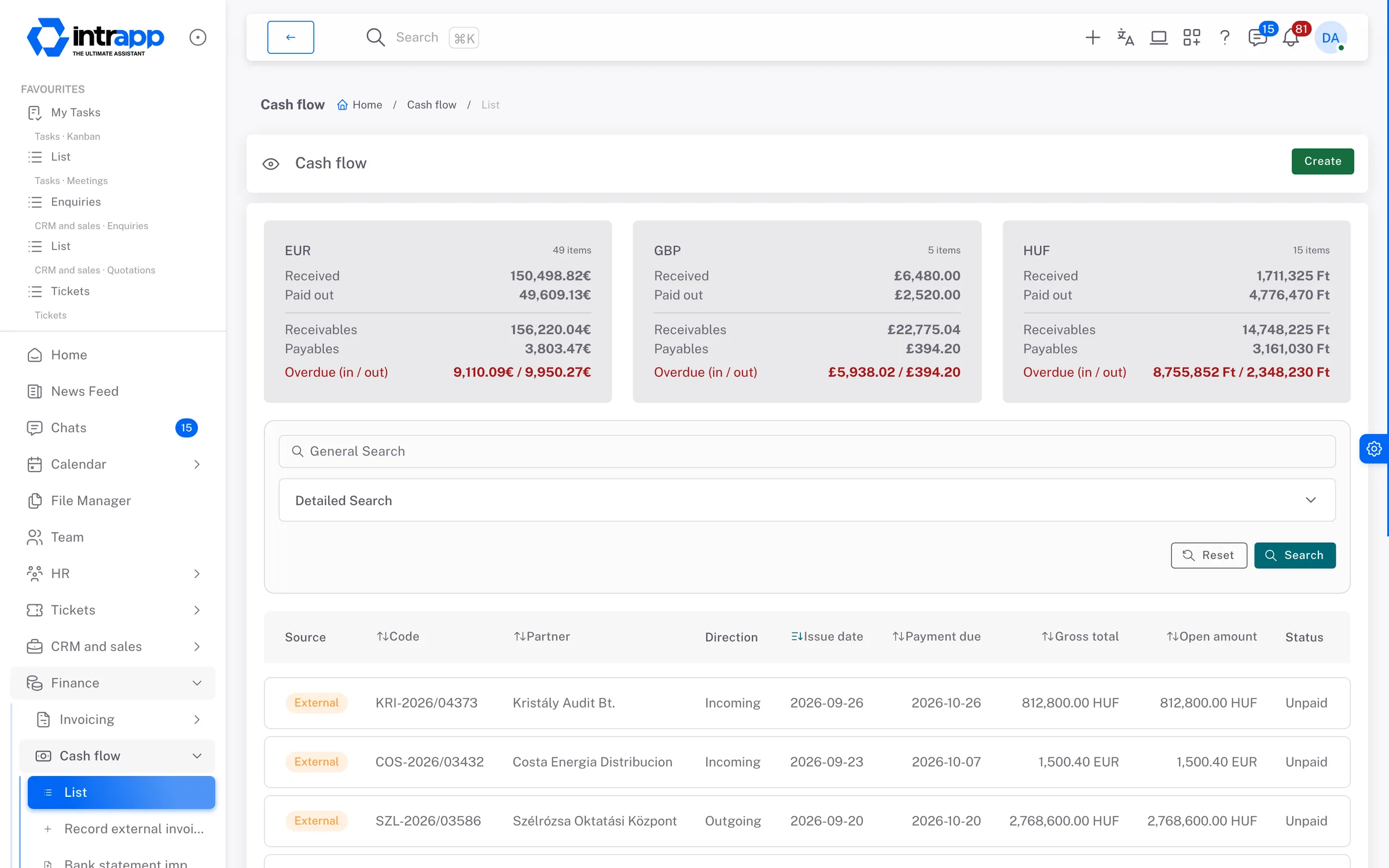
This page shows what a business owner needs every day, which is who has paid, who has not, and what falls due in the coming weeks. There is no general ledger, tax return or year-end close, because that is your accountant's job, and the invoicing export is made for their software.
Invoices issued in IntrApp appear here by themselves, a payment also shows in the customer's event log, and the document file goes into the customer's own folder in the file manager. You can record an external invoice straight from a statement line, so working through the statement also shows what was still missing.
Issuing invoices, cancellations and the accounting export are covered on the invoicing page.
By default, only administrators and system administrators can open cash flow and the bank statement import, and the finance blocks on the home screen only appear for them. Anyone without that permission does not even see an empty space where the blocks would be.
IntrApp does not connect directly to your bank, so you download the statement from your online banking. PDF statements are not processed, and one upload takes at most 5,000 lines. Only full settlements come over from the invoicing provider, not partial payments.
If you need liquidity planning or central management of many bank accounts, a specialist tool will serve you better. IntrApp shows who has paid, who has not, and how much.
We did not make these questions up; they are the ones prospective customers ask us most often. None of the answers is that you will get used to it.
If a statement format or a report is missing, tell us. If roughly three quarters of our customer base would use it, we build it for free, and every customer gets it. We decide whether a request falls into that group, because we can see the whole customer base. We do not promise a delivery date, but we do promise that the request goes into development.
The demo shows, with sample invoices and sample payments and no sign-up, how receivables add up. To try it with your own bank statement, that is what the trial is for.
Want to see how this would work for you? We will call you back.