English
Open the demo
Internal system for SMEs

Project management (Kanban)

Tasks and projects on one readable board: everyone can see where things stand, whose turn it is and what happens next. It ties the deadlines, the owners and the hours spent to the customer record, so work does not get done twice and promises do not get forgotten.

Why this page exists

What it actually solves

The deadline that lives in one head

Someone promised a date on the phone. It never reached a spreadsheet or a calendar, because there were eight other things that day. You find out when the customer asks, and by then you are late.

The work nobody wrote down

A colleague spent three days on the project. Those hours were never recorded. On paper the project is profitable; in reality you do not know, because one of the two numbers is missing.

The task that gets done twice

Two people started the same job, because neither could see that the other had picked it up. This kind of loss never shows up as a figure anywhere. It shows up as a month that ran out.
Kanban board

Real-time visibility without the round of asking

You can create a board for a customer, an internal project or a team. A board has an owner and a manager, it can be linked to a customer, and it can be archived once it is finished. You name the columns yourself, and there are as many of them as your work actually has steps.

Columns that follow your process

Rename them, reorder them, add new ones. If your work needs a "materials arrived" step between "ordered" and "on site", then the board has one. You are not fitting your process to somebody else's template.

The card carries the whole story

A name, a formatted description, an owner, a priority, and the customer it belongs to. Below that, the hours logged, the attached files and the comments. Whoever opens it does not then ask where the rest is.

Priorities you named yourself

Priorities get names and colours you choose. If in practice your team works with "today", "this week" and "can wait", then those are the three, instead of a five point scale whose middle nobody ever uses.

Public and private comments

A public comment is visible to the team, a private one only to you. So you do not have to choose between sharing a half formed thought and forgetting it.
Time tracking

Facts instead of guesswork

You can log time in minutes against anything: a kanban task, a ticket, a follow-up. It is not a separate record to be reconciled with the task list every week. It is the same data, entered once, where the work actually happened.

The hour stays with the work

It does not get reconstructed from memory into a Friday afternoon spreadsheet. A week later nobody can say what took three hours on Tuesday, and the guess always drifts in the more comfortable direction.

It reaches the customer too

If the task is linked to a customer, the time spent shows up on that customer's record as well. Nobody has to add it up, because it is already added up.

The entry knows what kind of work it was

You can record the type: development, project management, on site. So the report does not only say that a lot of time went somewhere, it says what it went on.

Reports with real filters

Filter by customer, person, project, task, ticket or period. This is usually the moment it turns out that the customer who demands the most work is not the largest one.
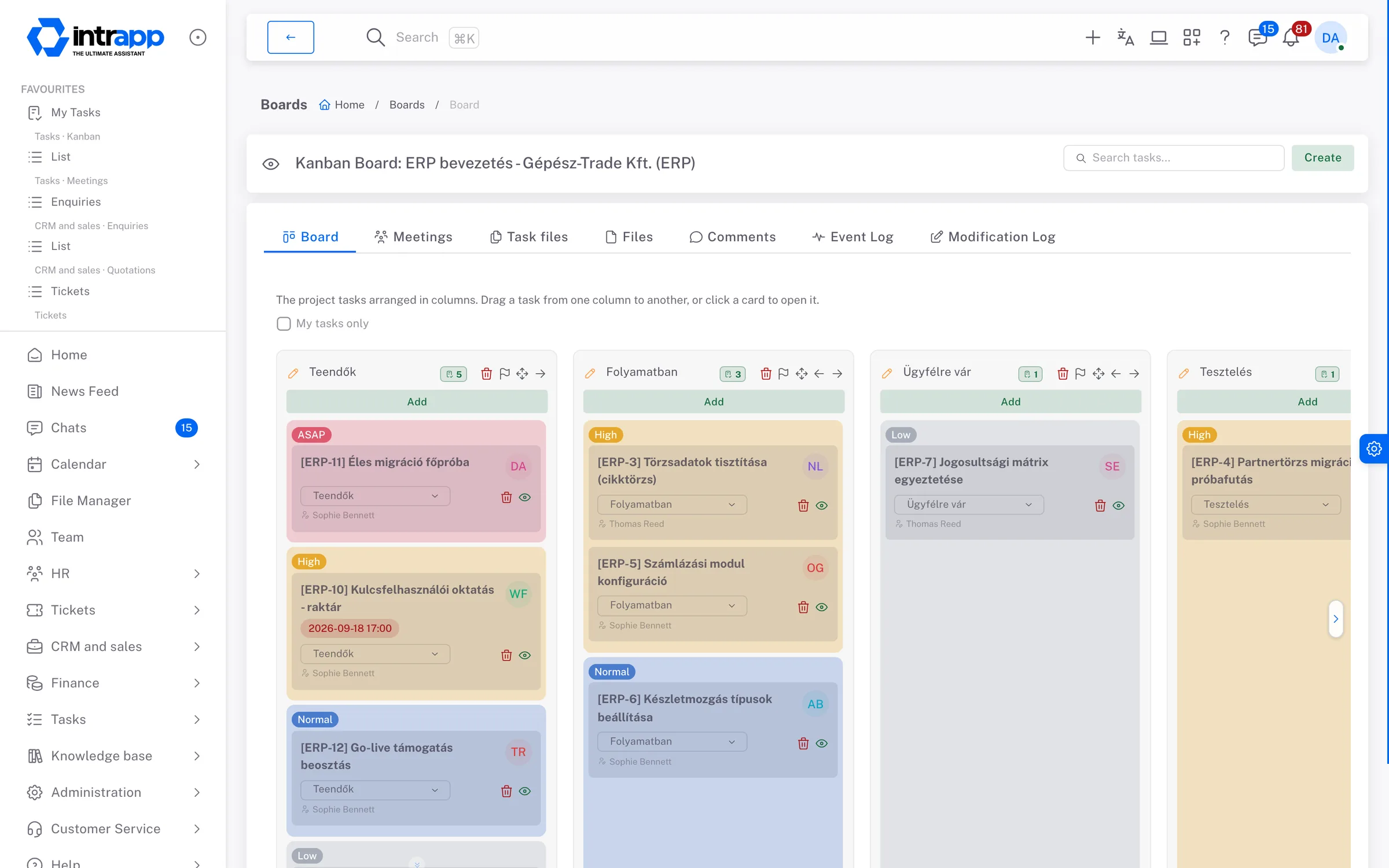
A kanban board in IntrApp: columns the team named itself, with priority and owner on the cards, and overdue deadlines in red.
How it fits together

One system instead of several

You cannot read this off a feature list, and yet it is the only difference between five subscriptions and one system. If you run five to ten separate applications today, that is not a system, because none of them knows about the others.

The same holds for the areas that have their own page now: the calendar and the to-do list, reminders and notes are not bolted on beside this. They are the same records seen from another side.

The task knows whose it is

A kanban card is linked to a customer, so the customer record shows what you are working on for them. Nobody has to gather that, because the link was made when the card was created.

Time lands where the work happened

There is no separate timesheet to reconcile with the task list. It is the same entry, made once, and it appears in the same report from both the project side and the customer side.

A ticket becomes a task

A reported issue turns into a kanban task in a few clicks, and the link between the two survives. Whoever works on it sees the original report, not somebody's summary of it.
Who sees what

Who has access to what

Two layers decide, and they are for different things:

One week

What this looks like in an ordinary week

A system is not good because it can do a lot. It is good because at three points in the week fewer questions have to be asked.

Monday morning

The list view holds this week's deadlines, the board holds whatever is stuck. Instead of going round the room asking who is working on what, only the questions that really have no answer are left.

Wednesday afternoon

The hour gets logged where the work is happening, on the task. Nobody puts it off until Friday, and nobody has to ask you what to book it against.

End of the month

The report shows which project took how many hours, and which customer took the most. That number is there so you know which work is worth taking on next time.
Questions

What people usually ask at this point

These are not our questions, they are the ones we get most often. None of the answers is that you will get used to it.

“A spreadsheet is enough for us”

While there are four of you, that is true. A spreadsheet breaks where two people open it at once, and where six months later nobody can tell who changed what. In IntrApp every change carries who made it and when.

“The team will not use it anyway”

This is the most common question, and a fair one. That is why there is a manual and a built-in walkthrough inside the app: if someone does not understand something, they do not have to ask you. There is no training day, because there is nothing to train.

“What happens to the data we have”

Customer and task lists can be imported at the start, so day one does not begin with an empty system. Data can be exported too, so starting does not lock you in.

“How long before it works”

Automated setup takes about half an hour and then you are live. There is no implementation project and no consultancy day rate. If you want help, our specialists are glad to give it.
Where we stop

Specialist tools are deep, and that is the problem

A dedicated project tool does hundreds of things. Most of that depth is neither understood nor used by most people. So the value is not depth, it is breadth and clarity. What we do when something is still missing is written out below.

What you will not find here

There is no resource planning, no Gantt chart and no dependency chain between tasks. If your work does not run without those, you are better off with a specialist tool, and it is better to know that now than in month three.

If something is missing, ask for it

If roughly three quarters of our customers would also get use out of it, we build it for free and everyone gets it. What really is specific to you gets built on its own branch, as paid work, and it keeps receiving the shared updates. Exactly where the line runs is set out on the custom development page.
No training required

There is a manual and a built-in walkthrough inside the app: if you do not understand something, the app explains it. Automated setup takes about half an hour, and there is no implementation fee. If you want help, our specialists are glad to give it.
Two different things

The demo is for looking, the trial is for deciding

They are not the same thing, and it matters which one you start with. Look around in the demo; decide in the trial.

The demo

A shared environment anyone can open, with no sign-up. It runs on the full sample data of a fictional company, so you are not looking at empty screens. Some functions are switched off in it, and every night it is wiped back to its base state: whatever you do there is gone by morning.

The trial

Your own instance, with full functionality and your own data. This is where it is decided whether it works for you, because you see it on your own projects rather than a sample company's. If it is not right, you cancel it like a streaming subscription.