English
Request a call Open the demo
Internal system for SMEs

Catalogue & pricing

Whatever you sell goes into the catalogue once, with a unit price, a VAT rate and a unit of measure, and from there onto every quotation and invoice. If you promised a customer or a group of customers a different price, you record that once too, and IntrApp applies it automatically when the document is made.

What it is for

What does it actually fix?

The price you have to change in twenty places

After a price rise the old price keeps turning up in quotations for months, because someone copied from an earlier document.

The discount that lives in one person's head

Often only one colleague knows who gets ten per cent off, who gets a fixed price, and until when. That works as long as the same colleague always writes the quotation.

The product whose cost nobody knows

A product is made of several parts. When one of them gets more expensive, the price still goes out based on last year's calculation.
Catalogue

Every price is kept in one place

Every catalogue item is a part, a product or a service, with a unit of measure, a list price and a cost. The VAT rate and the tax category, meaning the legal basis for how tax is handled, travel with the item onto the quotation and the invoice. You pick the category from the list for your company's country, and it also adds the mandatory wording to the document, so you do not have to remember which wording belongs to which item.

Fix a price in one place, not on twenty documents

You change the price in the catalogue, and it goes onto the next document from there. An item you make inactive stays on old documents, so past records are not rewritten.

A bill of materials that recalculates itself

A bill of materials is the list of a product's components, and IntrApp calculates the product's cost from it, for up to two hundred components. When a part gets more expensive, every product containing it is recalculated. That is how an entry control kit with a cost of €317 becomes €337 without anyone touching it.

In from a spreadsheet, out to one

Catalogue export and import use the same file format. You can bring in your current price list in one go, and correct it in bulk later, with a preview first.
Pricing variants

IntrApp knows what you promised to whom

For any item you can record a price agreement with a customer or a customer group, as a percentage discount, a markup, a fixed difference or a fixed price. IntrApp applies it automatically when the document is made, and states under the line which agreement it used. That way, a later “why did this go out at that price?” has an answer.

The same item, four prices

An item with a list price of €100 goes to Brookline Ltd. for €85 under its own agreement, to Harbour & Sons for €90 with its group's ten per cent discount, and to a new customer at list price. The spring offer's price of €80 only applies if the person making the document selects it.

Two invoices in a row never give different prices

If more than one agreement could apply, a fixed order decides. The customer's own agreement comes first, then the group's, then the list price. Validity is checked against the document date, not today's date.

Overriding leaves a trace

You can override the price by hand, but IntrApp logs both the calculated and the overridden value. Changing an agreement does not affect documents already issued.
Customer groups

Set it for the group, not customer by customer

A customer group, such as your resellers or key accounts, gives its members a default payment term and document template, and a price agreement can be attached to it too. A customer can belong to several groups, and the screen always shows where a value came from, so you do not have to guess.
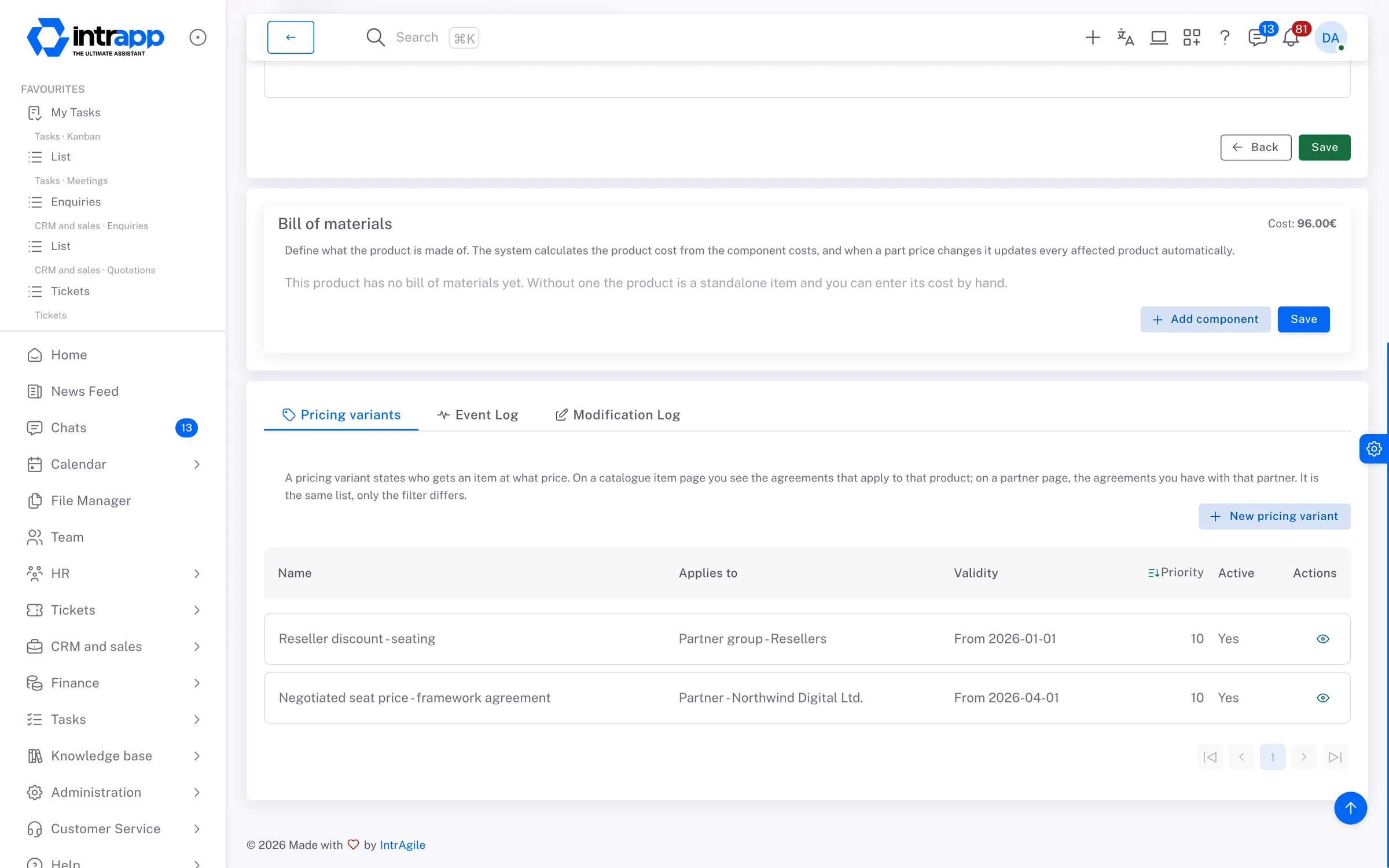
A catalogue item in IntrApp with its bill of materials, and below it the price agreements for a customer and a customer group.
How far we go

Pricing, not stock control

The catalogue records what you sell and for how much, but not how many are on the shelf. That is deliberate, because in a service or contracting business the problem is rarely stock, and far more often a quotation showing a price other than the one promised.

4 pricing methods
3 levels decide the price: customer, group, list
200 components fit in one bill of materials
How it connects

The price goes where it is needed

Catalogue items go onto quotations and invoices, and recurring invoicing takes the current price from here too, so a price rise applies to every monthly invoice automatically. A tab on the customer's record lists the agreements that apply to them.

Who sees what

Not everyone needs to see the cost

Costs and pricing rules are internal business data, visible only with a separate permission, because the rule and the final price together would reveal the cost. Whoever writes a quotation sees the final price, and sees the calculation only if they have the right.

What you will not find here

The right price on the document, not a stock ledger

IntrApp has no stock ledger, no purchasing and no warehouse movements. Bills of materials cannot be imported, and each bill of materials uses a single currency.

If the warehouse is your whole business, a specialist stock system will serve you better. What IntrApp does is keep the promised price, with its reason, on the quotation and the invoice.

Frequently asked

What most people ask at this point

Can we bring in our current price list?

Yes, you can import it from a spreadsheet with a preview. Units and currencies are entered as codes, while bills of materials are put together in IntrApp.

Can sales staff see the cost?

Only if you give them the right. Costs and pricing rules require a separate permission, while the final price is visible to anyone who makes documents.

What happens to old invoices when prices go up?

Nothing. Issued documents stay as they were. The new price appears on the next document, and on recurring invoices automatically.
Missing features

Ask, and you may not have to pay for it

If a pricing method or a field is missing, tell us. If roughly three quarters of our customers would use it too, we build it for free and every customer gets it. We decide whether a request falls into that group, because we see the whole customer base. We do not promise a delivery date, but we do promise that the request goes into development.

Take a look inside

The demo shows, with a sample catalogue, sample price agreements and no sign-up, how the right price reaches the quotation. You can try it with your own price list and data during the free trial.

Want to see how this would work for you? We will call you back.

Got a question? Rather talk to someone?

One of our team will get in touch within one working day.

When can we call?

If you add it, we send you a summary of our call.