English
Open the demo
Internal system for SMEs

Internal communication

Chat, a message board, one notification centre and comments that keep their context, on the same surface as the tasks, the projects and the customers. A remark lands on the ticket it belongs to, and a notification takes you to the work in one click, so nothing important is left in an isolated exchange.

Why this page exists

What it actually solves

Decisions nobody can reconstruct

The customer complains, and you cannot show what was agreed: the change came up in a chat, the revised drawing arrived as an attachment, and the task still carries its original wording. All three exist. None of them knows the other two do.

Conversations in three places

The agreement happens in a message, the file goes to a drive, and the task sits in a third tool. The problem is not anyone's memory. It is that the pieces never meet.

Information that depends on forwarding

“Nobody told me.” Usually true, because one person was supposed to pass it on and was at a customer site that day. A company should not run on somebody remembering.

Announcements that sink

The summer hours went out in an email in April. In July nobody can find it, and anyone who joined since does not know it existed.
Our approach

Communication next to the work, not beside it

Dedicated team messaging tools are deep: threads, bots, multi-step integrations. Most of that depth is neither understood nor used by most of the people who have it. In a growing company the real difficulty is that the conversation and the work live in two different places. What was needed is a plain surface where communication is part of the work rather than a parallel track.

0 separate chat subscriptions
1 notification centre for every module
~30 min automated setup
Chat

A quick question that does not break your focus

One-to-one conversations and named group rooms, in the same window as the customer and task work.

Read receipts in real time

You can see that it arrived and that it was read, and in a group, who has read it so far. That removes an entire category of message: “did you get this?”

Files saved to the central storage

Anything sent over chat is also in the file manager. Nobody has to scroll back three hundred messages to find last week's spreadsheet.

Internal messages stay out of the log

The system logs what changed and who changed it across every module. The text of chat messages is deliberately excluded. An internal message is not a business record.
Message board

One company feed

Announcements, changes to working hours and company news appear on a shared surface instead of sinking to the bottom of individual mailboxes.

History anyone can read back

A colleague who joined last month can scroll back through what happened before them. With a circular email that is impossible, because they were not on the April recipient list.

Colour-coded priorities

The type of a post shows on the board. Information does not look like a warning, so nobody has to read everything in order to work out what is urgent.

Optional moderation

It is a switch. Turn it on and new posts wait for approval, with the moderator able to send one back with a reason. Leave it off and nobody stands between a colleague and the board.
Notifications

One notification centre

Every module reports to the same place: a task assigned to you, a deadline coming up, a file shared with you, a calendar invitation.

Channels you set per event

More than twenty event types, and for each you decide separately whether you want it in the app, by email or as a browser notification. A system that tells everybody about everything teaches people within a fortnight to stop reading it.

It takes you to the thing

Not a line of text telling you something happened. Click it and you are on the task, the ticket or the partner it refers to.

Cleared in one action

An unread count in the header, the full list on one page, and a single action to mark everything read.
Comments

Remarks that keep their context

A comment goes on the thing it is about: a partner, a task or a ticket. That is why whoever opens it in six months finds the whole history on it.

History on the record itself

Not in your mailbox, but on that ticket or that task. Whoever takes it over sees exactly what you saw, without you having to hand anything over.

Targeted mentions (@name)

Mention a colleague and they are notified. Pulling somebody into the conversation is not a separate message on another channel.

Private or shared, comment by comment

For each comment you decide whether the team sees it or it stays your own working note.
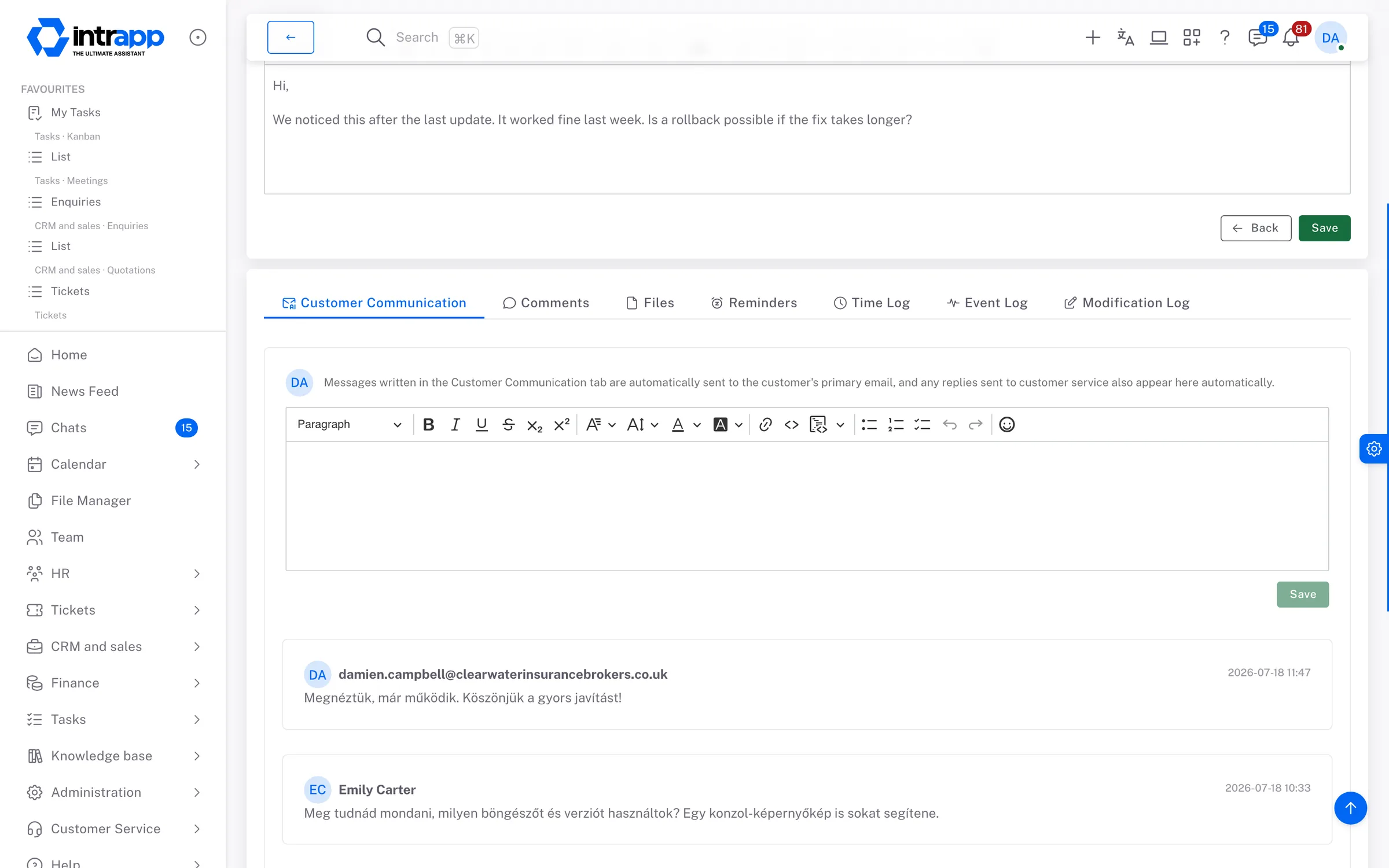
A report in IntrApp: under the record, the correspondence with the customer, with the colleagues' and the customer's messages in order.
How it fits together

One surface instead of scattered tools

The communication modules attach to the daily work rather than sitting beside it:

Who sees what

Different levels for different conversations

Visibility follows what kind of exchange it is. Chat messages are for the recipients and the members of the room. On comments you set private or team-wide per comment. Message board posts are open to the whole internal team, and files are shared by name with read or write access.

What you will not find here

Clean handling instead of unnecessary complexity

There is no message editing in chat, no threaded replies and no typing indicator. There is no built-in voice or video call, and no scheduled publishing on the message board. If your company genuinely runs on external bots and integrations, a dedicated tool will serve you better.

Common questions

“What if the team keeps chatting where they already do?”

Informal daily chat can stay where it is. What moves here on its own is the work conversation, the one attached to a project, a customer or a ticket, because next to the task is where it actually belongs.

“Do we need training?”

There is a manual and a step-by-step walkthrough inside the app, so people find their own way in. No training days, and nobody has to become the in-house expert.

“What does it cost to start?”

Automated setup takes about half an hour. There is no implementation fee and no compulsory consulting day.

“How flexible is the trial?”

During the trial you work in your own instance with your own data, and if it turns out not to be right, you cancel it.
If something is missing

Ask for it, and you may not have to pay

Write to us if a notification or a view is missing. Whatever roughly three quarters of our customers would use, we build for free, and every customer gets it. What is specific to you gets built under a separate agreement.

Two different things

The demo is for looking, the trial is for deciding

They are not the same thing, and it matters which one you start with. To look around and get a feel for the screens, the demo is the better choice; to actually decide, you want the trial.

The demo

A shared environment anyone can open, with no sign-up. It runs on the full data of a made-up company, so you see customer records, histories and tickets with things actually in them rather than empty lists. Some administrative functions are switched off, and every night it resets to its base state: whatever you create there is gone by morning.

The trial

Your own instance, with full functionality and your own customer data. This is where it shows whether the software fits the way you work. If you decide it does not, you cancel it like a streaming subscription, with nothing to settle.